在前一篇文章《在Kubernetes中创建NFS类型的StorageClass》 中,我们创建了一个StorageClass用于动态为PVC创建PV;
这篇文章我们会用这个StorageClass,来部署Zookeeper和Kafka;
在Kubernetes中部署Zookeeper和Kafka 前言 本次部署会使用到 bitnami 提供的 Helm Chart 直接进行安装;
可以参考的文章:
首先,会部署一个3节点Zookeeper集群,并通过NodePort对外暴露服务;
然后,会再部署 3节点 Kafka 集群,使用上面我们部署的 Zookeeper 来存储元数据,而不再单独创建;
注:还没有创建 StorageClass 的需要先看这篇文章《在Kubernetes中创建NFS类型的StorageClass》 创建!
关于 Helm 的安装,配置,这里就不再赘述了,可以参考官方文档:
Helm 安装之后还需要添加 bitnami 的 repo:
1
2
3
helm repo add bitnami https://charts.bitnami.com/bitnami helm repo update
查看:
1
2
3
4
5
root@ubuntu-1:~# helm repo list NAME URL stable http://mirror.azure.cn/kubernetes/charts/ bitnami https://charts.bitnami.com/bitnami
部署Zookeeper集群 部署集群 bitnami 官方文档:
使用 helm 部署 zookeeper 集群非常简单,通过下面一条命令即可:
1
2
3
4
5
6
helm install zookeeper bitnami/zookeeper \ --namespace workspace --create-namespace \ --set replicaCount=3 \ --set service.type=NodePort \ --set service.nodePorts.client="32181" \ --set global.storageClass=my-storage
参数说明:
--namespace workspace:部署的 namespace 为 workspace,可自行修改;--create-namespace:如果 namespace 不存在则创建;--set replicaCount=3:创建的 Zookeeper 有三个副本,即三节点;--set service.type=NodePort:服务暴露方式为 NodePort--set service.nodePorts.client="32181":对外 NodePort 的端口为 32181--set global.storageClass=my-storage:ZK 使用的存储为上一篇文章中创建的 StorageClass;
更多参数说明:
执行后输出如下:
1
2
3
4
5
6
7
8
9
10
11
12
13
14
15
16
17
18
19
20
21
22
23
24
25
26
27
NAME: zookeeper LAST DEPLOYED: Fri Dec 15 11:42:36 2023 NAMESPACE: workspace STATUS: deployed REVISION: 1 TEST SUITE: None NOTES: CHART NAME: zookeeper CHART VERSION: 12.3.4 APP VERSION: 3.9.1 ** Please be patient while the chart is being deployed ** ZooKeeper can be accessed via port 2181 on the following DNS name from within your cluster: zookeeper.workspace.svc.cluster.local To connect to your ZooKeeper server run the following commands: export POD_NAME=$(kubectl get pods --namespace workspace -l "app.kubernetes.io/name=zookeeper,app.kubernetes.io/instance=zookeeper,app.kubernetes.io/component=zookeeper" -o jsonpath="{.items[0].metadata.name}") kubectl exec -it $POD_NAME -- zkCli.sh To connect to your ZooKeeper server from outside the cluster execute the following commands: export NODE_IP=$(kubectl get nodes --namespace workspace -o jsonpath="{.items[0].status.addresses[0].address}") export NODE_PORT=$(kubectl get --namespace workspace -o jsonpath="{.spec.ports[0].nodePort}" services zookeeper) zkCli.sh $NODE_IP:$NODE_PORT
提示了 ZK 版本,以及连接到 ZK Pod 的几种方式;
注意:zookeeper.workspace.svc.cluster.local,这是 Zookeeper 服务在集群中的服务名,后面 Kafka 在连接时会用到!
部署验证 查看部署成功:
1
2
3
4
5
6
7
8
9
10
11
12
13
14
15
16
root@ubuntu-1:~# kubectl get po -n workspace NAME READY STATUS RESTARTS AGE zookeeper-0 1/1 Running 0 75s zookeeper-1 1/1 Running 0 75s zookeeper-2 1/1 Running 0 75s root@ubuntu-1:~# k get svc -n workspace NAME TYPE CLUSTER-IP EXTERNAL-IP PORT(S) AGE zookeeper NodePort 10.233.157.223 <none> 2181:32181/TCP,2888:32688/TCP,3888:32220/TCP 17s zookeeper-headless ClusterIP None <none> 2181/TCP,2888/TCP,3888/TCP 17s root@ubuntu-1:~# k get pvc -n workspace NAME STATUS VOLUME CAPACITY ACCESS MODES STORAGECLASS AGE data-zookeeper-0 Bound pvc-fcc70d18-fc0b-4b56-bb1e-66181fbe598f 8Gi RWO my-storage 5m1s data-zookeeper-1 Bound pvc-80ca6167-2f9d-48c6-ad6c-82549e713250 8Gi RWO my-storage 5m1s data-zookeeper-2 Bound pvc-c9c32d8d-9c21-4473-9d18-48b8b7b9edd7 8Gi RWO my-storage 5m1s
可以看到,我们已经通过 NodePort 暴露了 Client 连接端口;
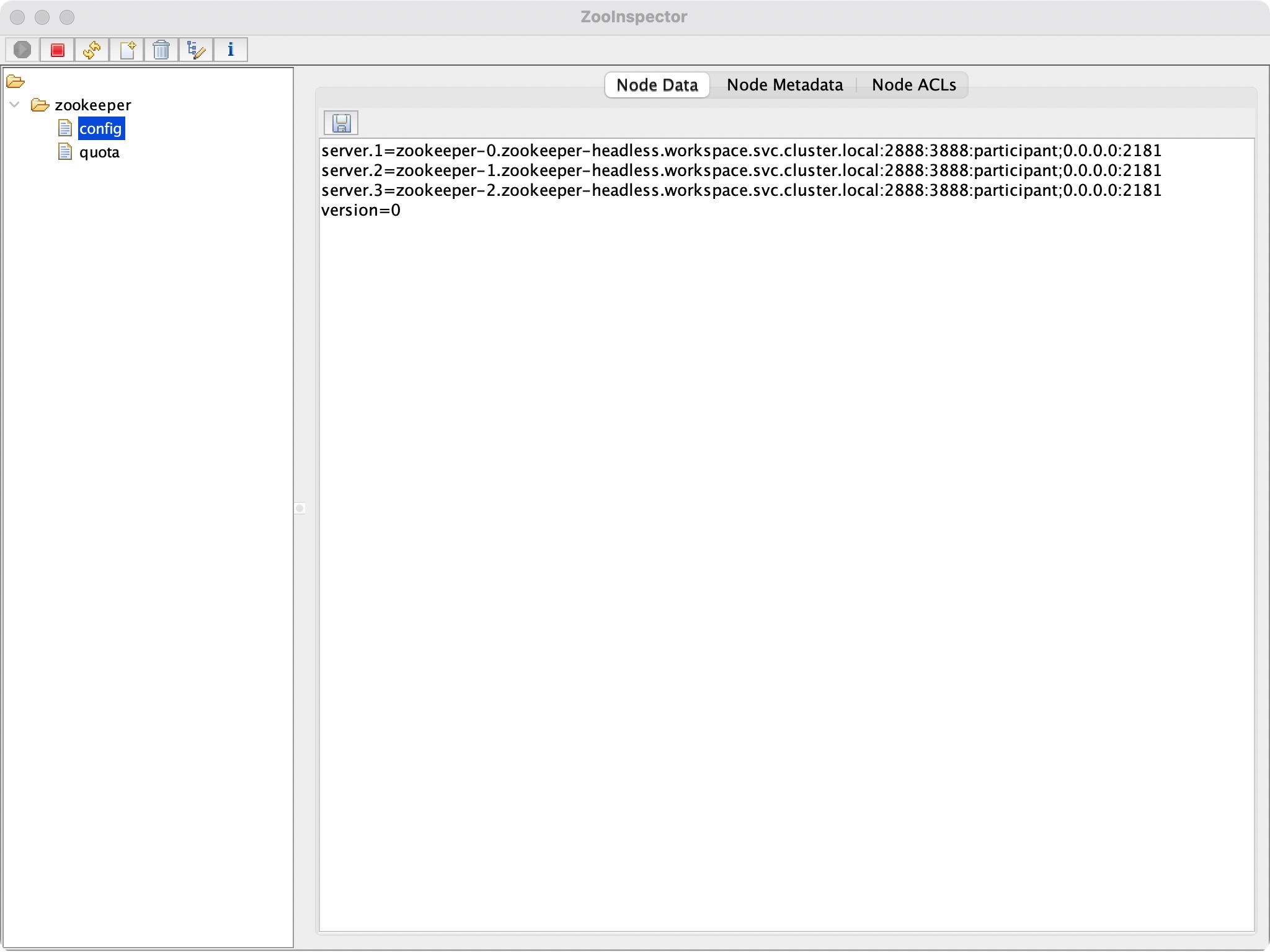
直接在本地连接即可,这里使用 Zookeeper 官方提供的 ZooInspector:
连接集群中哪个 Node 均可!
也可以使用代码连接~
至此,Zookeeper 集群就部署完成了!
部署Kafka集群 部署集群 在上面成功部署了 Zookeeper 的基础之上,我们继续部署 Kafka 集群:
1
2
3
4
5
6
7
8
9
10
11
12
13
14
15
16
17
18
19
export ZOOKEEPER_SERVICE_NAME='zookeeper.workspace.svc.cluster.local' # kafka helm install kafka bitnami/kafka \ --namespace workspace --create-namespace \ --set global.storageClass=my-storage \ --set broker.replicaCount=3 \ --set controller.replicaCount=0 \ --set zookeeper.enabled=false \ --set kraft.enabled=false \ --set externalZookeeper.servers=${ZOOKEEPER_SERVICE_NAME} \ --set externalAccess.enabled=true \ --set externalAccess.broker.service.type=NodePort \ --set externalAccess.broker.service.nodePorts[0]=30092 \ --set externalAccess.broker.service.nodePorts[1]=30093 \ --set externalAccess.broker.service.nodePorts[2]=30094 \ --set externalAccess.autoDiscovery.enabled=true \ --set serviceAccount.create=true \ --set rbac.create=true
参数说明:
--namespace workspace:部署的 namespace 为 workspace,可自行修改;--create-namespace:如果 namespace 不存在则创建;--set global.storageClass=my-storage:Kafka 使用的存储为上一篇文章中创建的 StorageClass;--set broker.replicaCount=3:kafka Broker 的副本数为 3;--set controller.replicaCount=0:不再创建 controller 而是使用我们之前已经创建的 Zookeeper 作为 Controller;--set zookeeper.enabled=false:不再创建 Zookeeper 而是使用我们之前已经创建的 Zookeeper;--set kraft.enabled=false:不使用 kraft 模式部署 Kafka(高版本的 Kafka 已不再使用 Zookeeper存储元数据,而是使用 Raft 协议将元数据存储在各个 Kafka 节点上);--set externalZookeeper.servers=${ZOOKEEPER_SERVICE_NAME}:声明使用我们已经部署的 Zookeeper,这里提供的是集群服务名;--set externalAccess.enabled=true:允许外部访问;--set externalAccess.broker.service.type=NodePort:使用 NodePort 暴露 Broker 的服务;--set externalAccess.broker.service.nodePorts[i]=x:设置第 i 个节点的端口号为x(对应external服务的端口号);--set externalAccess.autoDiscovery.enabled=true:允许服务自动发现;--set serviceAccount.create=true: k8s 集群外访问的 kafka-<0|1|2>-external 服务对应帐号;--set rbac.create=true: k8s 集群外访问的 kafka-<0|1|2>-external 服务对应 RBAC;
更多参数见官方文档:
执行后输出:
1
2
3
4
5
6
7
8
9
10
11
12
13
14
15
16
17
18
19
20
21
22
23
24
25
26
27
28
29
30
31
32
33
34
35
36
37
38
39
40
41
42
43
44
45
46
47
48
49
50
51
52
53
54
55
56
57
58
59
60
61
62
63
64
65
66
67
68
69
70
71
72
73
74
75
76
77
78
79
80
81
82
83
84
85
86
NAME: kafka LAST DEPLOYED: Fri Dec 15 12:25:26 2023 NAMESPACE: workspace STATUS: deployed REVISION: 1 TEST SUITE: None NOTES: CHART NAME: kafka CHART VERSION: 26.5.0 APP VERSION: 3.6.1 ** Please be patient while the chart is being deployed ** Kafka can be accessed by consumers via port 9092 on the following DNS name from within your cluster: kafka.workspace.svc.cluster.local Each Kafka broker can be accessed by producers via port 9092 on the following DNS name(s) from within your cluster: kafka-broker-0.kafka-broker-headless.workspace.svc.cluster.local:9092 kafka-broker-1.kafka-broker-headless.workspace.svc.cluster.local:9092 kafka-broker-2.kafka-broker-headless.workspace.svc.cluster.local:9092 The CLIENT listener for Kafka client connections from within your cluster have been configured with the following security settings: - SASL authentication To connect a client to your Kafka, you need to create the 'client.properties' configuration files with the content below: security.protocol=SASL_PLAINTEXT sasl.mechanism=SCRAM-SHA-256 sasl.jaas.config=org.apache.kafka.common.security.scram.ScramLoginModule required \ username="user1" \ password="$(kubectl get secret kafka-user-passwords --namespace workspace -o jsonpath='{.data.client-passwords}' | base64 -d | cut -d , -f 1)"; To create a pod that you can use as a Kafka client run the following commands: kubectl run kafka-client --restart='Never' --image docker.io/bitnami/kafka:3.6.1-debian-11-r0 --namespace workspace --command -- sleep infinity kubectl cp --namespace workspace /path/to/client.properties kafka-client:/tmp/client.properties kubectl exec --tty -i kafka-client --namespace workspace -- bash PRODUCER: kafka-console-producer.sh \ --producer.config /tmp/client.properties \ --broker-list kafka-broker-0.kafka-broker-headless.workspace.svc.cluster.local:9092,kafka-broker-1.kafka-broker-headless.workspace.svc.cluster.local:9092,kafka-broker-2.kafka-broker-headless.workspace.svc.cluster.local:9092 \ --topic test CONSUMER: kafka-console-consumer.sh \ --consumer.config /tmp/client.properties \ --bootstrap-server kafka.workspace.svc.cluster.local:9092 \ --topic test \ --from-beginning To connect to your Kafka nodes from outside the cluster, follow these instructions: NOTE: It may take a few minutes for the LoadBalancer IPs to be available. Watch the status with: 'kubectl get svc --namespace workspace -l "app.kubernetes.io/name=kafka,app.kubernetes.io/instance=kafka,app.kubernetes.io/component=kafka,pod" -w' Kafka Brokers domain: You will have a different external IP for each Kafka broker. You can get the list of external IPs using the command below: echo "$(kubectl get svc --namespace workspace -l "app.kubernetes.io/name=kafka,app.kubernetes.io/instance=kafka,app.kubernetes.io/component=kafka,pod" -o jsonpath='{.items[*].status.loadBalancer.ingress[0].ip}' | tr ' ' '\n')" Kafka Brokers port: 9094 To connect to your Kafka broker nodes from outside the cluster, follow these instructions: Kafka brokers domain: You can get the external node IP from the Kafka configuration file with the following commands (Check the EXTERNAL listener) 1. Obtain the pod name: kubectl get pods --namespace workspace -l "app.kubernetes.io/name=kafka,app.kubernetes.io/instance=kafka,app.kubernetes.io/component=kafka" 2. Obtain pod configuration: kubectl exec -it KAFKA_POD -- cat /opt/bitnami/kafka/config/server.properties | grep advertised.listeners Kafka brokers port: You will have a different node port for each Kafka broker. You can get the list of configured node ports using the command below: echo "$(kubectl get svc --namespace workspace -l "app.kubernetes.io/name=kafka,app.kubernetes.io/instance=kafka,app.kubernetes.io/component=kafka,pod" -o jsonpath='{.items[*].spec.ports[0].nodePort}' | tr ' ' '\n')" The EXTERNAL listener for Kafka client connections from within your cluster have been configured with the following settings: - SASL authentication To connect a client to your Kafka, you need to create the 'client.properties' configuration files with the content below: security.protocol=SASL_PLAINTEXT sasl.mechanism=SCRAM-SHA-256 sasl.jaas.config=org.apache.kafka.common.security.scram.ScramLoginModule required \ username="user1" \ password="$(kubectl get secret kafka-user-passwords --namespace workspace -o jsonpath='{.data.client-passwords}' | base64 -d | cut -d , -f 1)";
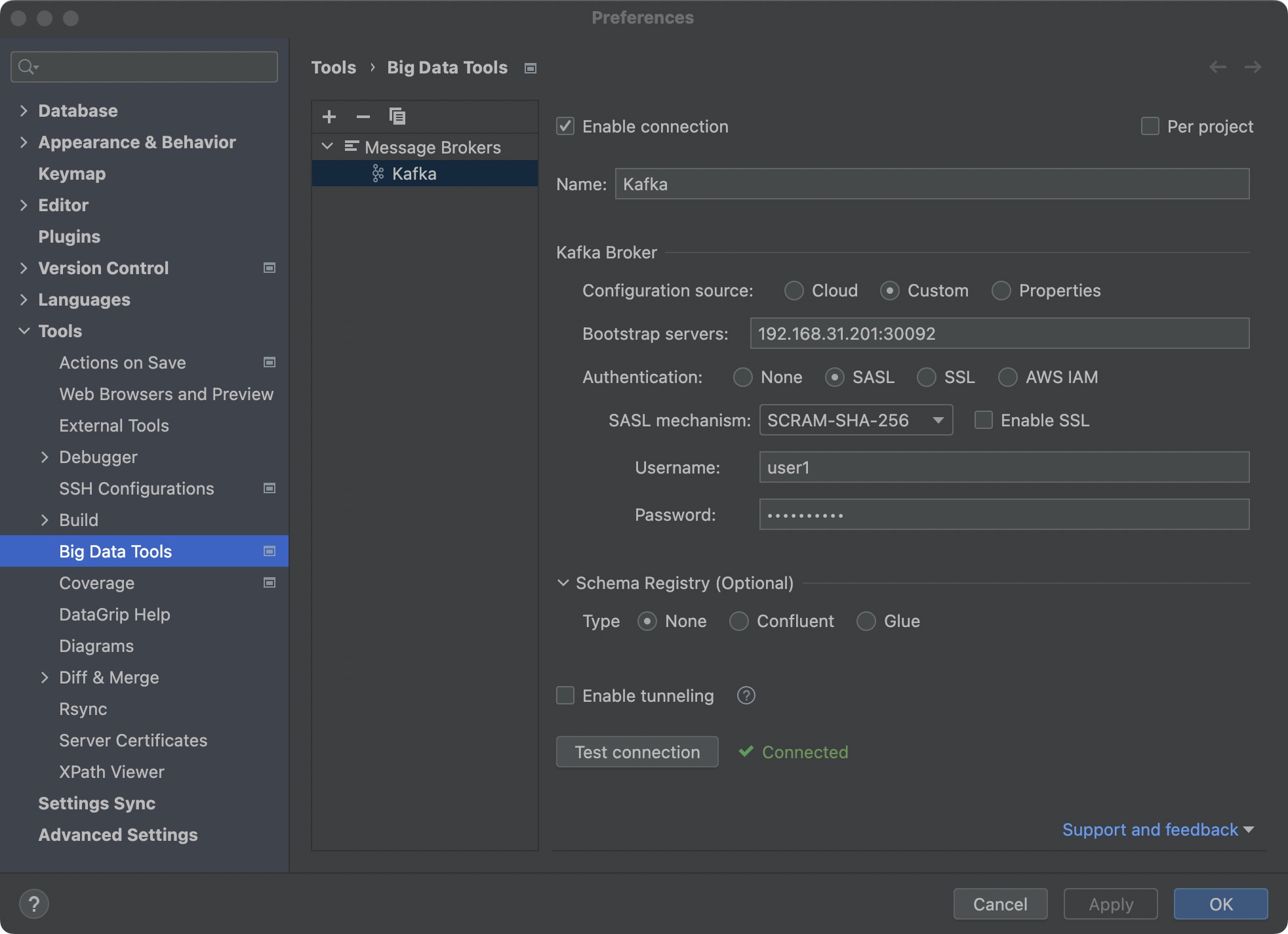
提供了多种连接 Kafka 集群中服务的方式,尤其要注意的是,我们部署的 Kafka 会使用 SASL 进行身份验证;
默认的username :user1
默认的password :存储在 K8S 的 secret 中,根据提示,可以通过下面的命令获取:
1
2
3
kubectl get secret kafka-user-passwords --namespace workspace -o jsonpath='{.data.client-passwords}' | base64 -d | cut -d , -f 1 # g2Xltk19G0
部署验证 查看部署成功:
1
2
3
4
5
6
7
8
9
10
11
12
13
14
15
16
17
18
19
20
21
22
23
24
25
26
27
root@ubuntu-1:~# k get po -n workspace NAME READY STATUS RESTARTS AGE kafka-broker-0 1/1 Running 0 8m54s kafka-broker-1 1/1 Running 0 8m54s kafka-broker-2 1/1 Running 0 8m54s zookeeper-0 1/1 Running 0 42m zookeeper-1 1/1 Running 0 42m zookeeper-2 1/1 Running 0 42m root@ubuntu-1:~# k get svc -n workspace NAME TYPE CLUSTER-IP EXTERNAL-IP PORT(S) AGE kafka ClusterIP 10.233.56.148 <none> 9092/TCP,9095/TCP 9m6s kafka-broker-0-external NodePort 10.233.117.223 <none> 9094:30092/TCP 9m7s kafka-broker-1-external NodePort 10.233.12.255 <none> 9094:30093/TCP 9m7s kafka-broker-2-external NodePort 10.233.187.124 <none> 9094:30094/TCP 9m7s kafka-broker-headless ClusterIP None <none> 9094/TCP,9092/TCP 9m6s zookeeper NodePort 10.233.157.223 <none> 2181:32181/TCP,2888:32688/TCP,3888:32220/TCP 42m zookeeper-headless ClusterIP None <none> 2181/TCP,2888/TCP,3888/TCP 42m root@ubuntu-1:~# k get pvc -n workspace NAME STATUS VOLUME CAPACITY ACCESS MODES STORAGECLASS AGE data-kafka-broker-0 Bound pvc-38d3502c-638c-433d-949f-8d2a9780322b 8Gi RWO my-storage 9m22s data-kafka-broker-1 Bound pvc-16ab6844-be99-448b-8147-2dac1f74eeab 8Gi RWO my-storage 9m22s data-kafka-broker-2 Bound pvc-301855a2-a0ca-4b0b-816a-adbb1422446b 8Gi RWO my-storage 9m22s data-zookeeper-0 Bound pvc-fcc70d18-fc0b-4b56-bb1e-66181fbe598f 8Gi RWO my-storage 42m data-zookeeper-1 Bound pvc-80ca6167-2f9d-48c6-ad6c-82549e713250 8Gi RWO my-storage 42m data-zookeeper-2 Bound pvc-c9c32d8d-9c21-4473-9d18-48b8b7b9edd7 8Gi RWO my-storage 42m
可以看到,服务已经成功部署,并且 kafka-broker-0-external、kafka-broker-1-external、kafka-broker-2-external 分别暴露在 30092、30093、30094 端口;
真正使用时,暴露一个端口,然后连接 K8S 集群任意一个 Node 的对应即可!
可以使用 DataGrip 中的 Kafka 插件来测试:
总结 查找错误 在使用 bitnami 创建资源的时候,基本上都需要查看官方提供的文档:
同时,如果因为参数错误,报错无法部署,可以仔细查看报错的内容,也可以通过在这里找对应的检测逻辑来判断具体哪个参数有问题:
数组参数 bitnami 的某些参数为一个数组,例如:controller.extraContainerPorts;
如果是命令行输入,可以通过加空格的方式输入多个,例如:
1 --set controller.extraContainerPorts='30001 30002 30003'
附录 参考文章: