使用C++解释器Cling
众所周知C++是一门编译型的语言,我们需要先将C++的源代码进行编译、连接生成二进制,然后才能执行;
而Cling是一个构建在Clang和LLVM之上的一个C++解释器,它允许我们像Python一样实现对C++代码的逐行执行!
同时,Cling也支持集成进JupyterLab中直接使用!
源代码:
使用C++解释器Cling 前言 官方的介绍如下:
1 Cling is an interactive C++ interpreter, built on top of Clang and LLVM compiler infrastructure. Cling realizes the read-eval-print loop (REPL) concept, in order to leverage rapid application development. Implemented as a small extension to LLVM and Clang, the interpreter reuses their strengths such as the praised concise and expressive compiler diagnostics.
Cling是一个构建在Clang和LLVM编译器之上的交互式的C++解释器;Cling实现了 read-eval-print loop (REPL) 来满足更快速的应用程序开发;作为LLVM和Clang的一个扩展实现,解释器重用了它们的优点,如:良好和简洁的编译诊断提示;
下面,废话不多说,直接进入安装阶段;
安装并配置 安装Cling 因为Cling存在 Nightly-Build 的版本,我们可以直接下载编译好的二进制即可:
通过编译源码安装需要安装大量的编译工具,这里不推荐!
下载:
1 wget https://root.cern.ch/download/cling/cling_2020-11-05_ROOT-centos7.tar.bz2
解压缩:
1 tar -xjvf cling_2020-11-05_ROOT-centos7.tar.bz2
此时已经安装完成,并且官方已经提供了Clang和LLVM环境,二进制文件在bin目录下:
1
2
3
4
5
6
7
8
9
10
11
12
13
14
15
16
17
18
19
20
21
22
23
24
25
26
27
28
29
30
31
32
33
34
35
36
37
38
39
40
$ tree -L 2 . ├── bin │ ├── c-index-test │ ├── clang -> clang-5.0 │ ├── clang++ -> clang │ ├── clang-5.0 │ ├── clang-check │ ├── clang-cl -> clang │ ├── clang-cpp -> clang │ ├── clang-format │ ├── clang-import-test │ ├── clang-offload-bundler │ ├── clang-rename │ ├── cling │ ├── git-clang-format │ ├── llvm-tblgen │ ├── scan-build │ └── scan-view ├── include │ ├── clang │ ├── clang-c │ ├── cling │ ├── llvm │ └── llvm-c ├── lib │ ├── clang │ ├── cmake │ ├── libclangAnalysis.a │ ├── …… ├── libexec │ ├── c++-analyzer │ └── ccc-analyzer └── share ├── clang ├── cling ├── man ├── opt-viewer ├── scan-build └── scan-view
将Bin命令加入环境变量PATH中即可;
使用 安装完成后,可以使用命令cling进入交换模式:
1
2
3
4
5
6
7
8
9
10
11
$ cling ****************** CLING ****************** * Type C++ code and press enter to run it * * Type .q to exit * ******************************************* [cling]$ [cling]$ printf ("Hello World!\n" )Hello World! (int) 13 [cling]$
也可以直接在命令行执行多条语句:
1
2
3
4
$ cling '#include <stdio.h>' 'printf("Hello World!\n")' Hello World! (int) 13
或者执行整个C++脚本文件:
1
2
3
4
5
6
7
8
9
10
11
$ cat test.cpp# include <stdio.h> printf("Hello World!\n"); $ cat test.cpp | cling****************** CLING ****************** * Type C++ code and press enter to run it * * Type .q to exit * ******************************************* Hello World!
当然,如果只是在命令行执行,那使用起来就非常不爽了!
而Cling的一大优点是可以集成进Jupyter中!
关于安装JupyterLab见:
JupyterLab中集成Cling 关于在JupyterLab中集成Cling,官方也提供了说明:
首先,进入我们的Cling安装目录:
1
2
3
4
5
6
7
8
9
10
11
12
13
$ pwd /opt/cling $ ll total 36 drwxr-xr-x 7 root root 4096 Nov 9 14:08 . drwxr-xr-x 11 root root 4096 Nov 9 13:53 .. drwxr-xr-x 4 14806 2735 12288 Nov 5 2020 lib drwxr-xr-x 8 14806 2735 4096 Nov 5 2020 share drwxr-xr-x 2 14806 2735 4096 Nov 5 2020 bin drwxr-xr-x 7 14806 2735 4096 Nov 5 2020 include drwxr-xr-x 2 14806 2735 4096 Nov 5 2020 libexec
进入share/cling/Jupyter/kernel目录下:
1
2
3
4
5
6
7
8
9
10
11
12
13
14
15
16
17
18
$ cd share/cling/Jupyter/kernel/$ ll total 64 drwxr-xr-x 9 14806 2735 4096 Nov 8 20:13 . drwxr-xr-x 2 root root 4096 Nov 8 20:13 __pycache__ drwxr-xr-x 2 root root 4096 Nov 8 20:13 clingkernel.egg-info drwxr-xr-x 3 14806 2735 4096 Nov 5 2020 .. drwxr-xr-x 2 14806 2735 4096 Nov 5 2020 cling-cpp11 drwxr-xr-x 2 14806 2735 4096 Nov 5 2020 cling-cpp14 drwxr-xr-x 2 14806 2735 4096 Nov 5 2020 cling-cpp17 drwxr-xr-x 2 14806 2735 4096 Nov 5 2020 cling-cpp1z drwxr-xr-x 2 14806 2735 4096 Nov 5 2020 scripts -rw-r--r-- 1 14806 2735 2335 Nov 5 2020 cling.ipynb -rw-r--r-- 1 14806 2735 13022 Nov 5 2020 clingkernel.py -rw-r--r-- 1 14806 2735 721 Nov 5 2020 .gitignore -rw-r--r-- 1 14806 2735 2574 Nov 5 2020 setup.py
使用pip安装依赖:
在Jupyter中安装对应执行的Kernel:
1
2
3
4
jupyter-kernelspec install [--user] cling-cpp17 jupyter-kernelspec install [--user] cling-cpp1z jupyter-kernelspec install [--user] cling-cpp14 jupyter-kernelspec install [--user] cling-cpp11
可以根据需要安装对应的Kernel,如果全部安装则会显示多个;
如果安装时JupyterLab已经打开,则需要重启JupyterLab才能生效!
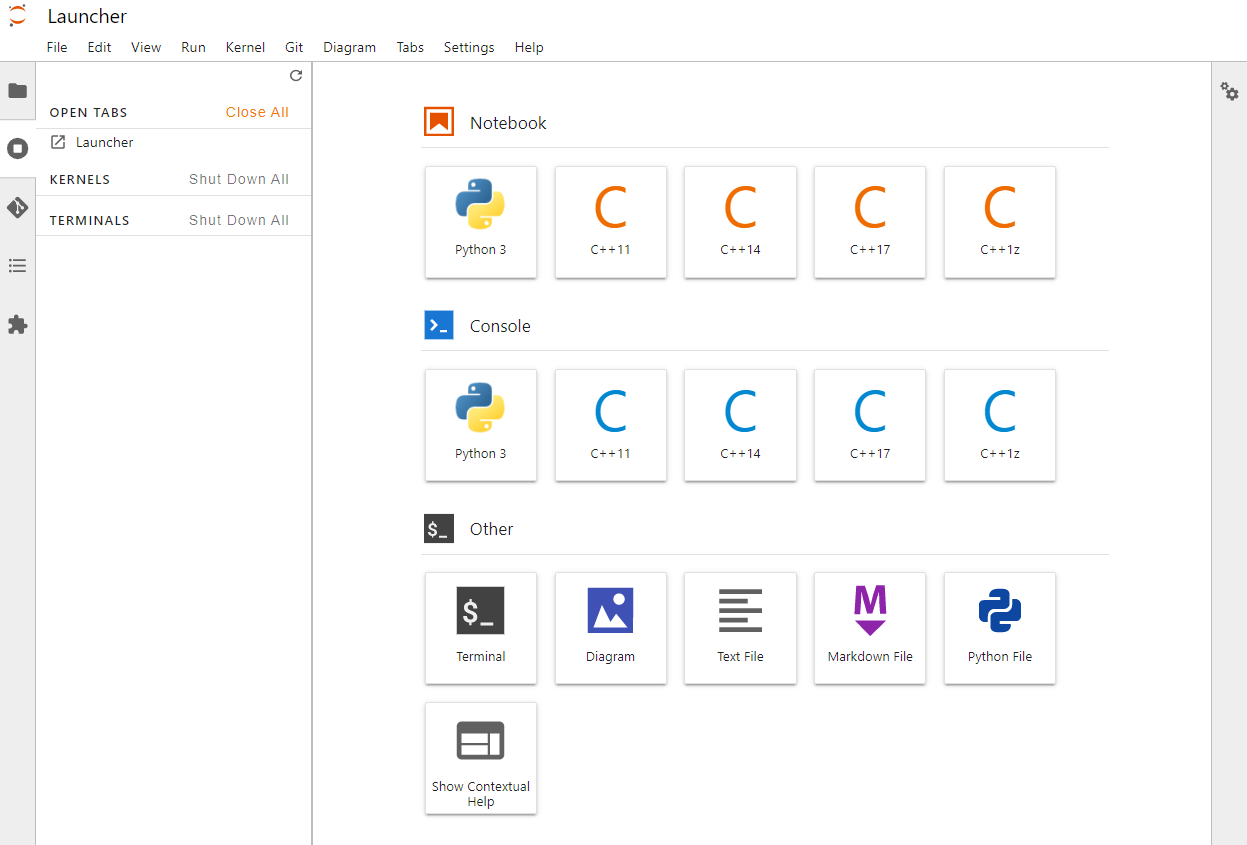
重启后,进入JupyterLab的效果如下图:
会出现对应C++的选项;
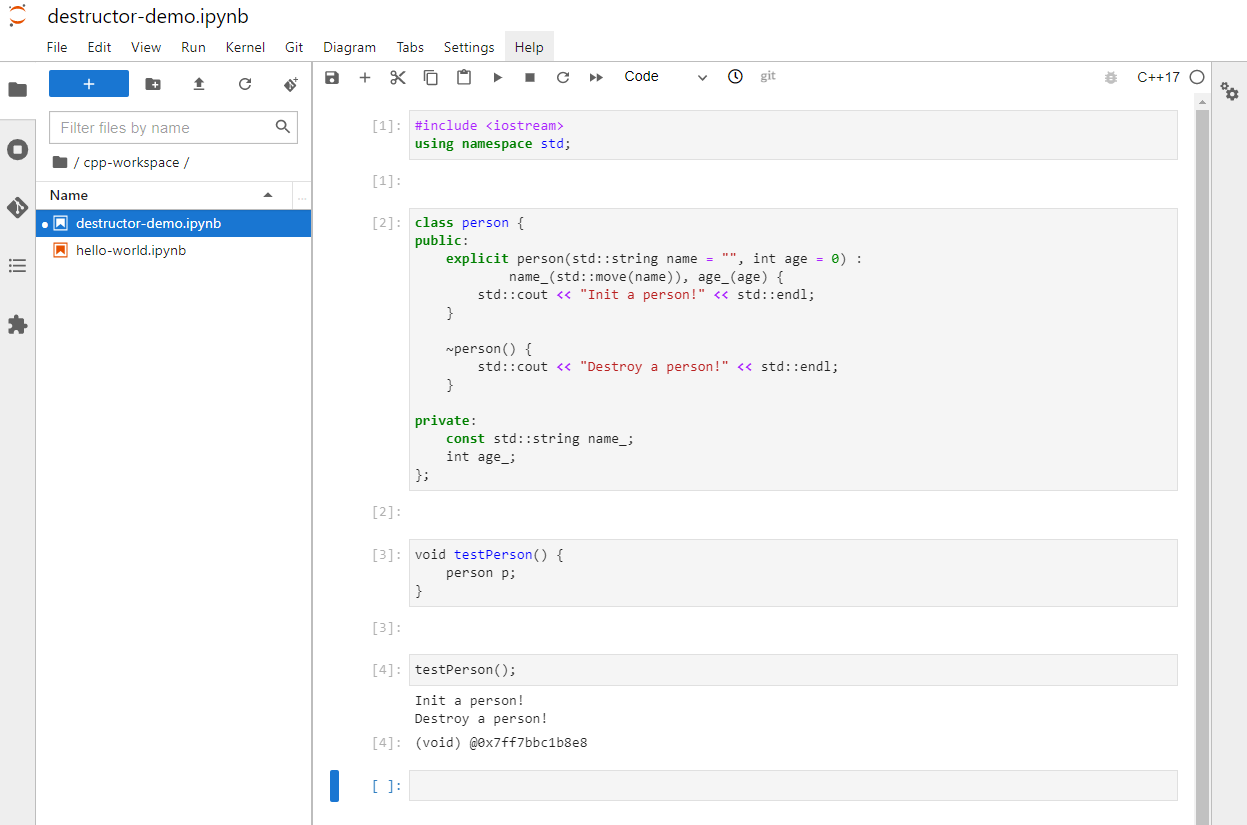
我们可以在JupyterLab中创建一个文件,进行尝试;
如,下面是一个测试C++中 Constructor 和 Destructor 特性的代码:
可以看到,代码已经成功的被执行了!
Cling结合JupyterLab非常适合学习C++:我们只需要关注和编写突出某个C++特性的代码块即可执行,而无需编写整个C++文件,包括main函数!
除此之外Cling还提供了更多的特性,有空大家可以更多的去尝试!
附录 源代码:
相关阅读: