Golang在1.16中加入了embed包,可以将文件直接打包为二进制;除此之外,github的开源库rakyll/statik也提供了类似的功能,并且使用起来也很方便;
本文使用rakyll/statik 库,以一个TODO List应用为例,打包了一个二进制的React SPA应用;
源代码:
使用Go打包二进制React单页面应用 前言 在微服务 + 云上部署大行其道的今天,其实把所有的静态资源全部打包到一个二进制文件是相当不明智的(类似于Java Web项目打包到一整个jar包或者war包);
但是对于二进制来说,可以在一定程度上降低软件分发的难度,以及用户的使用难度;
想象一下,整个项目只有一个二进制,双击打开就好,完全的纯净版是多么的爽!
Golang在1.16中加入了embed包,可以将文件直接打包为二进制;
除此之外,github的开源库rakyll/statik也提供了类似的功能,并且使用起来也很方便;
所有,本文使用rakyll/statik 库,以一个TODO List应用为例,打包了一个二进制的React SPA应用;
构建React SPA应用 在项目根目录使用命令create-react-app创建一个React项目:
如果没有安装这个命令,可以使用npm直接安装:
1 npm install -g create-react-app
项目创建完成后,依赖会自动下好;
下面我们使用React进行进行TODO List的开发;
首先添加Todo.js作为Todo List中单个项的组件:
web/Todo.js
1
2
3
4
5
6
7
8
9
10
import React , {useState} from 'react' export const Todo = ({handleAdd} ) => { const [description, setDescription] = useState ('' ) return (<form onSubmit ={x => handleAdd({description})}> <input type ="text" value ={description} onChange ={x => setDescription(x.target.value)}></input > <button disabled ={description.length < 1 }> Add</button > </form > )}
其次,添加整个TODO List的列表项Todos.js和Todos.css:
web/Todos.js
1
2
3
4
5
6
7
8
9
10
11
12
13
14
15
16
17
18
19
20
21
22
23
24
25
26
27
28
29
30
31
32
33
34
35
36
37
38
39
40
41
42
43
44
45
46
47
48
49
50
51
52
53
54
55
56
57
58
59
60
61
62
63
64
65
66
67
68
69
70
71
72
73
74
75
76
77
78
79
80
81
82
import React , {Component , Fragment } from 'react' import {Todo } from './Todo' import './Todos.css' export class Todos extends Component { constructor ( super () this .state = { todos : [], waiting : false } this .handleAdd = this .handleAdd .bind (this ) } componentDidMount ( this .setState ({waiting : true }) fetch ('/todo' ) .then (response => this .setState ({waiting : true }) if (response.status === 200 ) { return response.json () } }) .then (todos => this .setState ({todos}) }) .finally (() => { this .setState ({waiting : false }) }) } handleAdd (todo ) { if (!todo.description ) return this .setState ({waiting : true }) fetch ('/todo' , { method : 'POST' , headers : { 'Accept' : 'application/json' , 'Content-Type' : 'application/json' }, body : JSON .stringify (todo) }) .then (response => this .setState ({waiting : true }) if (response.status === 200 ) { return response.json () } }) .then (todos => this .setState ({todos}) }) .finally (() => { this .setState ({waiting : false }) }) } render ( const renderInput = ( const {waiting} = this .state if (!waiting) { return ( <Todo handleAdd ={this.handleAdd}/ > ) } return (<div > Waiting...</div > } return ( <Fragment > <ul className ="Todos" > {this.state.todos != null ? ( this.state.todos.map(x => (<li > {x.description} </li > ))) : null } </ul > {renderInput()} </Fragment > ) } }
web/Todos.css
1
2
3
4
5
6
7
8
9
10
.Todos { list-style-type : none; } .Todos li { padding : 16px ; border-width : 0 0 1px 0 ; border-color : #eee ; border-style : solid; }
接下来我们还要修改App.js,让他加载我们的Todos组件:
web/App.js
1
2
3
4
5
6
7
8
9
10
11
12
13
14
15
16
17
18
import React , { Component } from 'react' import {Todos } from './Todos' import logo from './logo.svg' ;import './App.css' ;export default class App extends Component { render ( return ( <div className ="App" > <header className ="App-header" > Todo App </header > <Todos /> </div > ) } }
这时候的样式比较奇怪(因为还是原来React欢迎页的样式);
修改App.css:
web/App.css
1
2
3
4
5
6
7
8
9
10
11
12
13
14
15
16
17
18
19
20
21
22
23
24
25
26
27
28
29
30
31
32
33
34
35
36
37
38
39
.App { text-align : center; } .App-logo { height : 40vmin ; pointer-events : none; } @media (prefers-reduced-motion : no-preference) { .App-logo { animation : App-logo-spin infinite 20s linear; } } .App-header { background-color : #282c34 ; display : flex; flex-direction : column; align-items : center; justify-content : center; font-size : calc (10px + 2vmin ); color : white; padding : 16px ; } .App-link { color : #61dafb ; } @keyframes App-logo-spin { from { transform : rotate (0deg ); } to { transform : rotate (360deg ); } }
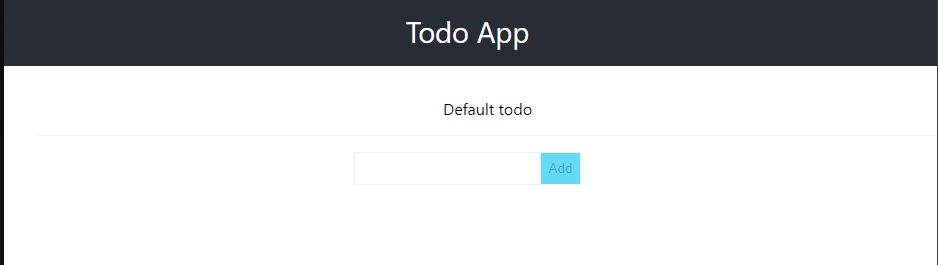
最后,使用yarn start启动;
效果如下:
尝试添加几个Todo项,会发现此时是无法添加的,因为我们的App需要和后端进行交互!
至此,我们的React SPA应用开发完毕!
下面进行后台Go项目;
创建Go项目 在根目录下使用go mod命令创建项目:
1 go mod init github.com/jasonkayzk/go-spa-demo
随后创建main.go
main.go
1
2
3
4
5
6
7
8
9
10
11
12
13
14
15
16
17
18
19
20
21
22
23
24
25
26
27
28
29
30
31
32
33
34
35
36
37
38
39
40
41
42
43
44
45
46
47
48
49
50
51
52
53
54
55
56
57
58
59
60
61
62
63
64
65
66
67
68
69
70
71
72
73
74
75
76
77
78
79
80
81
82
83
84
85
86
87
88
package mainimport ( "fmt" "log" "net/http" _ "github.com/jasonkayzk/go-spa-demo/statik" "github.com/labstack/echo" "github.com/rakyll/statik/fs" ) var e = echo.New()type Todo struct { Description string `json:"description"` } func (t *Todo) error { if t.Description == "" { return fmt.Errorf("Item is missing it's description" ) } return nil } type ErrorJSON struct { Message string `json:"message"` } type todoController struct { get func (c echo.Context) error post func (c echo.Context) error } func newTodoController () todos := []*Todo{ &Todo{ Description: "Default todo" , }, } return &todoController{ get: func (c echo.Context) error { e.Logger.Printf("Handle get" ) return c.JSON(http.StatusOK, todos) }, post: func (c echo.Context) error { e.Logger.Printf("Handle post" ) t := &Todo{} if err := c.Bind(t); err != nil { e.Logger.Printf("Could not parse request" ) return c.JSON(http.StatusBadRequest, err) } if err := t.Validate(); err != nil { e.Logger.Printf("Validation failed" ) return c.JSON(http.StatusBadRequest, ErrorJSON{Message: err.Error()}) } todos = append (todos, t) return c.JSON(http.StatusOK, todos) }, } } func main () addr := ":8080" statikFS, err := fs.New() if err != nil { log.Fatal(err) } staticHandler := http.FileServer(statikFS) tc := newTodoController() e.GET("/*" , echo.WrapHandler(http.StripPrefix("/" , staticHandler))) e.GET("/todo" , tc.get) e.POST("/todo" , tc.post) e.Logger.Fatal(e.Start(addr)) }
这里有必要解释一下代码;
首先,go项目使用labstack/echo ,作为服务器后端的web框架;
因为这个库是一个高性能,并且极简的web框架:
High performance, minimalist Go web framework
其次,代码引入了rakyll/statik 依赖;
并且_ "github.com/jasonkayzk/go-spa-demo/statik"这个包,即statik目录目前是不存在的,需要后期通过statik命令生成!
首先通过echo.New()创建了一个echo Web服务器;
随后定义了一个Todo类,用于存放React中的单个Todo条目;并给Todo类添加了一个Validate方法,用于检测内容是否为空;
随后创建了todoController类,包括了get和post两个方法;
在newTodoController类中,完成了创建一个todoController类,并创建get和post两个函数的逻辑;
get函数:返回todos的json列表;
post函数:实现添加一个todo条目的逻辑;
由于例子比较简单,所以每次get或者post都会返回整个todo list的内容;
但是这样效率是比较低的,感兴趣的同学可以尝试优化;
最后在main函数中:
首先创建了statikFS(即通过statik编译后的二进制文件系统);
随后使用http.FileServer将statikFS转换为一个静态文件目录的handler(前端页面);
随后,初始化了controller,并使用echo声明了:
/*:根目录为前端静态页面入口;/todo:前端get和post接口路由;
最后,启动web服务器;
至此整个go项目后台编写完毕;
接下来编译整个项目!
使用statik编译二进制并编译项目 statik编译二进制概述 rakyll/statik 官方仓库地址如下:
使用前可能需要安装:
clone源码,go build,并把编译出的statik二进制加入系统变量Path即可!
statik的使用方式也很简单:
1 statik -src=/path/to/your/project/public
使用-src直接指定静态文件所在目录即可;
当然,也可以使用-include=*.jpg,*.txt,*.html,*.css,*.js指定需要编译的文件类型;
更多使用方式可以查看官方文档;
例如:在项目的根目录下编译:
1 statik.exe -src=./web/build
会在根目录下生成statik目录以及statik/statik.go文件;
文件中的data即编译后的二进制数据;
编译整个项目 在编译时,首先我们应该先编译前端项目,并生成静态文件;
随后,使用statik编译前端的静态项目;
最后,再编译整个go项目,生成二进制文件;
即命令如下:
1 2 3 4 5 6 cd web && yarn && yarn build && cd ..statik -f -src=./web/build go build -o app main.go
为了方便起见,我们可以编写一个Makefile文件,这样就不需要每次都输入这么多命令了;
Makefile
1
2
3
4
5
6
7
8
9
10
11
12
13
14
15
16
17
18
19
20
21
22
23
24
25
26
27
all: cd web && yarn && yarn build && cd .. statik -f -src=./web/build go build -o app main.go .ONESHELL: statik: cd web && yarn && yarn build && cd .. statik -src=./web/build dev: watcher -startcmd -cmd="go run main.go" clean: rm app setup: go get github.com/rakyll/statik go get github.com/canthefason/go-watcher go get github.com/mitchellh/gox cross-platform: gox -output="build/{{.Dir}}_{{.OS}}_{{.Arch}}" .PHONY : all clean statik dev cross-platform
在Windows下使用make可能需要安装mingw等GNU套件;
最后,让我们试一下效果:
1
2
3
4
5
6
7
8
9
10
11
12
13
14
15
16
17
18
19
20
21
22
23
24
25
26
27
28
29
30
31
32
33
34
35
36
37
38
39
40
41
D:\workspace\go-spa-demo>make cd web && yarn && yarn build && cd ..statik -f -src=./web/build go build -o app main.go yarn install v1.22.5 [1/4] Resolving packages... success Already up-to-date. Done in 0.46s. yarn run v1.22.5 $ react-scripts build Creating an optimized production build... Compiled with warnings. src\App.js Line 3:8: 'logo' is defined but never used no-unused-vars Search for the keywords to learn more about each warning. To ignore, add // eslint-disable-next-line to the line before. File sizes after gzip: 42.19 KB build\static\js\2.55a8d793.chunk.js 1.57 KB build\static\js\3.01417940.chunk.js 1.17 KB build\static\js\runtime-main.08b54c47.js 1.04 KB build\static\js\main.d5c45919.chunk.js 624 B build\static\css\main.668855c6.chunk.css The project was built assuming it is hosted at /. You can control this with the homepage field in your package.json. The build folder is ready to be deployed. You may serve it with a static server: yarn global add serve serve -s build Find out more about deployment here: https://cra.link/deployment Done in 4.67s.
编译成功,并且项目根目录下生成app二进制文件!
测试项目 运行编译生成的二进制文件;
注:如果是在windows环境下,可能需要修改文件名为app.exe
打开后端服务器:
1 2 3 4 5 6 7 8 9 10 11 D:\workspace\go-spa-demo >.\app.exe ____ __ / __/___/ / ___ / _// __/ _ \/ _ \ /___/\__/_//_/\___/ v3.3.10 -dev High performance, minimalist Go web framework https://echo.labstack.com ____________________________________O/_______ O\ ⇨ http server started on [::]:8080
访问localhost:8080,结果如下:
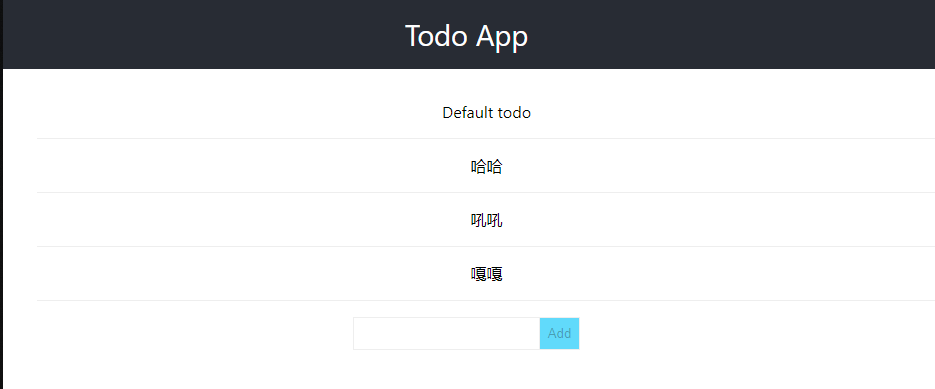
添加多个Todo项,结果:
同时后端输出日志:
1
2
3
4
5
6
7
8
{ "time" : "2021-03-28T21:26:30.6609505+08:00" , "level" : "-" , "prefix" : "echo" , "file" : "main.go" , "line" : "53" , "messa ge" : "Handle get" } { "time" : "2021-03-28T21:27:49.7780022+08:00" , "level" : "-" , "prefix" : "echo" , "file" : "main.go" , "line" : "57" , "messa ge" : "Handle post" } { "time" : "2021-03-28T21:27:52.6052245+08:00" , "level" : "-" , "prefix" : "echo" , "file" : "main.go" , "line" : "57" , "messa ge" : "Handle post" } { "time" : "2021-03-28T21:27:54.2510517+08:00" , "level" : "-" , "prefix" : "echo" , "file" : "main.go" , "line" : "57" , "messa ge" : "Handle post" }
成功!
附录 源代码:
项目参考: