Node+Redis实现基于IP的限流策略
API限频可以保护和提高API的服务的可用性;如果某个IP在一个时间段进行大量的访问请求(例如典型的DDos攻击),不但会影响其他用户的访问,严重的还有可能直接拖垮整个服务;
针对API限流有多种策略,Node.js可以使用Koa现成的限流模块koa-ratelimit ,Java也有对应的限频实现方式(通常通过注解+AOP的方式即可实现);
本文使用Redis+Node,以相当轻量级的方式实现了针对IP的访问限频,起到了抛砖引玉的作用;
源代码:
Node+Redis实现基于IP的限流策略 废话不多说,直接来写!
建立Node项目 ① 初始化Node项目 首先初始化一个node项目:
添加 --yes 标志来使用默认选项;
编辑package.json文件:
1
2
3
4
5
6
7
8
9
10
11
12
13
14
15
{ "name" : "redis_rate_limit" , "version" : "1.0.0" , "author" : "Jasonkay" , "license" : "MIT" , "main" : "index.js" , "scripts" : { "test" : "echo \"Error: no test specified\" && exit 1" , "start" : "node index.js" } , "dependencies" : { "express" : "^4.17.1" , "ioredis" : "^4.17.3" } }
项目使用到了express和ioredis;
② 创建index.js并安装依赖 创建index.js文件,并安装依赖:
③ 编辑index.js 在index.js中创建一个/路径的路由:
1
2
3
4
5
6
7
8
9
10
11
12
13
const express = require ('express' )const app = express ()const port = process.env .PORT || 3000 app.post ('/' , (req, res ) => { res.send ('Post has no rate limit!' ) }) app.get ('/' , async (req, res) => { res.send ("Accessed precious resources!" ) }) app.listen (port, () => console .log (`Example app listening at http://localhost:${port} ` ))
此时启动服务器,可以使用Get或者Post请求到页面信息;
下面我们使用Redis来添加接口限频;
使用Redis进行接口限频 首先在index.js中初始化redis连接,以及连接成功后的log输出:
1
2
3
4
5
6
7
8
9
10
11
12
const Redis = require ('ioredis' )const client = new Redis ({ port : process.env .REDIS_PORT || 6379 , host : process.env .REDIS_HOST || 'localhost' , password : "admin" , family : 4 , db : 0 , }) client.on ('connect' , () => { console .log ('Redis connected!' ); });
为了方便演示限流,我们在Get请求中进行限流操作;
修改app.get:
1 2 3 4 5 6 7 8 9 10 app.get ('/' , async (req, res) => { if (!await checkPermission (req.ip )) { res.status (429 ).send ('Too many requests - try again later' ) return } res.send ("Accessed precious resources!" ) })
处理get请求时,首先在req中取得请求的ip地址,并通过checkPermission函数判断是否已经限频;
下面重点来看checkPermission函数;
1
2
3
4
5
6
7
8
9
10
11
12
13
14
15
16
17
18
async function checkPermission (ip ) { if (await isBlocked (ip)) { return false } if (await isOverLimit (ip)) { try { await doBlock (ip); } catch (err) { console .error ("execute doBlock err:" , err) } return false } return true }
在checkPermission函数中:
首先判断IP是否已经在黑名单:在黑名单则直接返回false拒绝访问;
此后判断是否超过了单位时间访问次数,如果超过了
如果上述两个检验均通过,则返回true;
下面来分别查看isBlocked、isOverLimit和doBlock函数:
1
2
3
4
5
6
7
8
9
10
11
12
13
14
15
16
17
18
19
20
21
22
23
24
25
26
27
28
29
30
31
32
33
34
35
36
37
const EXPIRE_SECOND = 5 const LIMIT_RATE = 20 const BLOCK_SECOND = 86400 const BLOCK_SUFFIX = '-blocked' async function isBlocked (ip ) { return (await client.get (ip + BLOCK_SUFFIX )) > 0 ; } async function isOverLimit (ip ) { let res try { res = await client.incr (ip) } catch (err) { console .error ('isOverLimit: could not increment key' ) throw err } console .log (`${ip} has value: ${res} ` ) if (res > LIMIT_RATE ) { return true } client.expire (ip, EXPIRE_SECOND ) } async function doBlock (ip ) { let res; try { res = await client.set (ip + BLOCK_SUFFIX , 1 , 'ex' , BLOCK_SECOND ) } catch (err) { console .error ('doBlock: could not set key' ) throw err } console .log (`${ip} has bend blocked: ${res} ` ) }
在doBlock函数中,判断是否有IP+BLOCK_SUFFIX对应的过期Key存在,如果存在,则说明这个IP在黑名单中;
在isOverLimit中每次访问将访问的IP对应的Key的值加一并设置过期时间窗口为EXPIRE_SECOND,如果在EXPIRE_SECOND时间内key的值超过了设定的LIMIT_RATE,则直接调用doBlock函数将IP加入黑名单;
在doBlock函数中,插入IP+BLOCK_SUFFIX的Key,并设置过期时间(黑名单保留时间)为BLOCK_SECOND;
至此,使用Redis进行IP限流的操作完成,下面进行测试;
接口访问测试 正确配置并安装依赖后,使用下面的命令启动项目:
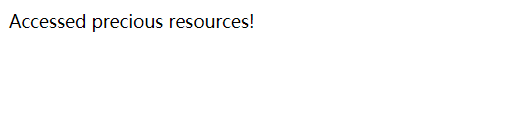
并访问:http://localhost:3000/
显示如下:
在控制台输出:
说明在Redis中创建了对应窗口的Key:
下面快速刷新,直到达到了窗口限频;
此时窗口显示为:
控制台显示:
1
2
3
4
5
6
7
8
9
10
11
12
13
14
15
16
17
18
19
20
21
22
::1 has value: 1 ::1 has value: 2 ::1 has value: 3 ::1 has value: 4 ::1 has value: 5 ::1 has value: 6 ::1 has value: 7 ::1 has value: 8 ::1 has value: 9 ::1 has value: 10 ::1 has value: 11 ::1 has value: 12 ::1 has value: 13 ::1 has value: 14 ::1 has value: 15 ::1 has value: 16 ::1 has value: 17 ::1 has value: 18 ::1 has value: 19 ::1 has value: 20 ::1 has value: 21 ::1 has bend blocked: OK
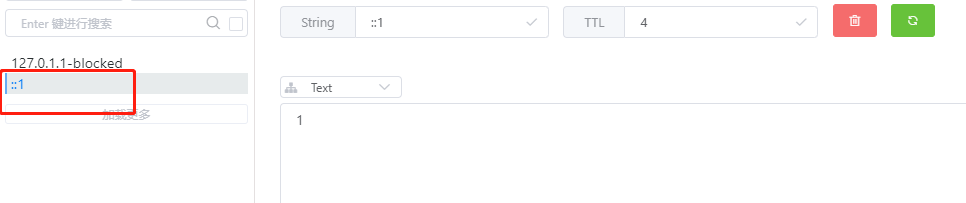
此时Redis中可以看到::1已经被加入黑名单:
此后再访问页面都将会显示Too many requests - try again later;
最后,将Key::1-blocked删除;
访问恢复正常;
总结 本文讲述了如何使用Redis实现一个基于IP的限流策略,起到了抛砖引玉的作用;
在实际项目中建议使用例如Koa框架中提供的限流模块koa-ratelimit 等;
并且本例中还有许多值得优化的点,比如:
在响应正文或Retry-afterHeader中添加block时长,让用户知道在重试之前应该等待多少时间;
记录达到速率限制的请求,以了解用户行为并警告恶意攻击;
使用其他速率限制算法或其他中间件;
附录 源代码: