文章524
标签277
分类67

SpringBoot集成Swagger

最近写的项目都用到了Swagger生成文档, 所以本篇总结一下如何在Spring Boot中集成Swagger


Spring Boot集成Swagger

本文使用Spring Boot + Spring Fox的方法来集成Swagger框架

具体源码可参考: https://github.com/JasonkayZK/Java_Samples/tree/swagger


一. 引入依赖

1
2
3
4
5
6
7
8
9
10
11
12
13
14
15
16
17
18
19
20
21
22
23
24
25
26
27
28
29
30
31
32
33
34
35
36
37
38
39
40
41
42
43
44
45
46
47
48
49
50
51
52
53
54
55
56
57
58
59
60
61
62
63
64
65
66
67
68
69
70
71
72
73
74
75
76
77
78
79
80
81
82
83
84
85
86
87
88
89
90
91
92
93
94
95
96
97
98
99
100
101
102
103
104
105
106
107
108
109
110
111
112
113
114
115
<?xml version="1.0" encoding="UTF-8"?>
<project xmlns="http://maven.apache.org/POM/4.0.0"
xmlns:xsi="http://www.w3.org/2001/XMLSchema-instance"
xsi:schemaLocation="http://maven.apache.org/POM/4.0.0 http://maven.apache.org/xsd/maven-4.0.0.xsd">
<modelVersion>4.0.0</modelVersion>

<groupId>top.jasonkayzk</groupId>
<artifactId>swagger_demo</artifactId>
<version>1.0-SNAPSHOT</version>
<packaging>jar</packaging>

<name>swagger-demo</name>
<description>Spring Boot集成Swagger案例项目</description>

<developers>
<developer>
<name>Jasonkay</name>
<url>https://github.com/JasonkayZK</url>
<email>jasonkayzk@gmail.com</email>
</developer>
</developers>

<properties>
<project.build.sourceEncoding>UTF-8</project.build.sourceEncoding>
<project.reporting.outputEncoding>UTF-8</project.reporting.outputEncoding>
<java.version>11</java.version>
<spring.boot.version>2.1.1.RELEASE</spring.boot.version>
<swagger.version>2.9.2</swagger.version>
<lombok.version>1.18.10</lombok.version>
</properties>

<parent>
<groupId>org.springframework.boot</groupId>
<artifactId>spring-boot-starter-parent</artifactId>
<version>2.1.1.RELEASE</version>
<relativePath/> <!-- lookup parent from repository -->
</parent>

<dependencies>
<!-- spring boot web -->
<dependency>
<groupId>org.springframework.boot</groupId>
<artifactId>spring-boot-starter-web</artifactId>
</dependency>

<!-- spring boot data jpa -->
<dependency>
<groupId>org.springframework.boot</groupId>
<artifactId>spring-boot-starter-data-jpa</artifactId>
</dependency>

<!-- spring boot test -->
<dependency>
<groupId>org.springframework.boot</groupId>
<artifactId>spring-boot-starter-test</artifactId>
<scope>test</scope>
</dependency>

<!-- h2 database -->
<dependency>
<groupId>com.h2database</groupId>
<artifactId>h2</artifactId>
</dependency>

<!-- swagger2 ui -->
<dependency>
<groupId>io.springfox</groupId>
<artifactId>springfox-swagger-ui</artifactId>
<version>${swagger.version}</version>
</dependency>

<!-- swagger2 -->
<dependency>
<groupId>io.springfox</groupId>
<artifactId>springfox-swagger2</artifactId>
<version>${swagger.version}</version>
<scope>compile</scope>
</dependency>

<!-- lombok -->
<dependency>
<groupId>org.projectlombok</groupId>
<artifactId>lombok</artifactId>
<version>${lombok.version}</version>
<scope>provided</scope>
</dependency>
</dependencies>

<build>
<resources>
<resource>
<directory>${basedir}/src/main/resources</directory>
<includes>
<include>*.yml</include>
<include>*.properties</include>
<include>*.xml</include>
</includes>
</resource>
</resources>

<plugins>
<plugin>
<groupId>org.apache.maven.plugins</groupId>
<artifactId>maven-compiler-plugin</artifactId>
<version>3.8.0</version>
<configuration>
<target>${java.version}</target>
<source>${java.version}</source>
<encoding>UTF-8</encoding>
</configuration>
</plugin>
</plugins>
</build>

</project>

说明:

本示例项目采用的是:

  • Java 11
  • Spring boot: 2.1.1.RELEASE
  • Swagger: 2.9.2
  • Lombok: 1.18.10

二. 在SpringBoot中配置Swagger

1
2
3
4
5
6
7
8
9
10
11
12
13
14
15
16
17
18
19
20
21
22
23
24
25
26
27
28
29
30
31
32
33
34
35
36
37
38
39
40
41
42
43
44
45
46
47
48
49
50
51
52
53
54
55
56
57
58
59
60
61
62
63
64
65
66
67
68
69
70
71
72
73
74
75
76
77
78
79
80
81
package top.jasonkayzk.swaggerDemo.config;

import org.springframework.beans.factory.annotation.Value;
import org.springframework.context.annotation.Bean;
import org.springframework.context.annotation.Configuration;
import springfox.documentation.builders.ApiInfoBuilder;
import springfox.documentation.builders.PathSelectors;
import springfox.documentation.builders.RequestHandlerSelectors;
import springfox.documentation.service.*;
import springfox.documentation.spi.DocumentationType;
import springfox.documentation.spi.service.contexts.SecurityContext;
import springfox.documentation.spring.web.plugins.Docket;
import springfox.documentation.swagger2.annotations.EnableSwagger2;

import java.util.List;

import static com.google.common.collect.Lists.newArrayList;

/**
* A config file for swagger
*
* @author zk
*/
@Configuration
@EnableSwagger2
public class SwaggerConfig {

@Value("${swagger.switch}")
private boolean swaggerSwitch;

@Bean
public Docket createRestApi() {
return new Docket(DocumentationType.SWAGGER_2)
.apiInfo(apiInfo())
.select()
.apis(RequestHandlerSelectors.basePackage("top.jasonkayzk.swaggerDemo"))
.paths(PathSelectors.any())
.build()
.securitySchemes(securitySchemes())
.securityContexts(securityContexts());
}

/**
* 项目信息
*/
private ApiInfo apiInfo() {
return new ApiInfoBuilder()
.title("Swagger demo")
.description("A demo for swagger bind with spring boot")
.contact(new Contact("Jasonkay", "/cn/", "jasonkayzk@gmail.com"))
.termsOfServiceUrl("/cn/")
.version("1.0")
.build();
}

/**
* 配置认证模式
*/
private List<ApiKey> securitySchemes() {
return newArrayList(new ApiKey("Authorization", "Authorization", "header"));
}

/**
* 配置认证上下文
*/
private List<SecurityContext> securityContexts() {
return newArrayList(SecurityContext.builder()
.securityReferences(defaultAuth())
.forPaths(PathSelectors.any())
.build());
}

private List<SecurityReference> defaultAuth() {
AuthorizationScope authorizationScope = new AuthorizationScope("global", "accessEverything");
AuthorizationScope[] authorizationScopes = new AuthorizationScope[1];
authorizationScopes[0] = authorizationScope;
return newArrayList(new SecurityReference("Authorization", authorizationScopes));
}

}


说明:

Swagger官方Wiki 注解

swagger2常用注解说明

swagger注释API详细说明

以上几篇文章已经将Swagger注解的使用方式及作用阐述的非常清楚了。这里只给出代码案例

springfox-swagger2:2.7.0已经支持泛型返回对象

注意:千万不要在@ApiOperation注解里限定response(),让框架推断类型就行了


三. SQL

为了方便示例演示, 采用了H2内置数据库进行操作, 具体的SQL语句如下:

schema.sql

1
2
3
4
5
6
create table if not exists `user` (
`id` int(10) unsigned not null auto_increment,
`username` varchar(30) not null,
`password` varchar(30) not null,
primary key (`id`)
);

data.sql

1
2
3
insert into `user`(`id`, `username`, `password`) values (1, 'Jasonkay1', '123456');
insert into `user`(`id`, `username`, `password`) values (2, 'Jasonkay2', '123456');
insert into `user`(`id`, `username`, `password`) values (3, 'Jasonkay3', '123456');

四. 通用接口层

ResponseCode

1
2
3
4
5
6
7
8
9
10
11
12
13
14
15
16
17
18
19
20
21
22
23
24
25
26
27
28
package top.jasonkayzk.swaggerDemo.constant;

import static top.jasonkayzk.swaggerDemo.common.ResponseResult.ResponseParam;
import static top.jasonkayzk.swaggerDemo.common.ResponseResult.ResponseParam.buildParam;

/**
* Response Code
*
* @author zk
*/
public enum ResponseCode {

SUCCESS(buildParam(0, "SUCCESS"));

public final ResponseParam PARAM;

ResponseCode(ResponseParam param) {
this.PARAM = param;
}

public int getCode() {
return this.PARAM.getCode();
}

public String getMsg() {
return this.PARAM.getMsg();
}
}

ResponseResult

1
2
3
4
5
6
7
8
9
10
11
12
13
14
15
16
17
18
19
20
21
22
23
24
25
26
27
28
29
30
31
32
33
34
35
36
37
38
39
40
41
42
43
44
45
46
47
48
49
50
51
52
53
54
55
56
57
58
59
60
61
62
63
64
65
66
67
68
69
70
71
72
73
74
75
76
77
78
79
80
81
package top.jasonkayzk.swaggerDemo.common;

import io.swagger.annotations.ApiModel;
import io.swagger.annotations.ApiModelProperty;
import lombok.Data;

/**
* A general response class
*
* @author zk
*/
@Data
@ApiModel(description = "General response class")
public class ResponseResult<T> {

private static final int SUCCESS_CODE = 0;

private static final String SUCCESS_MESSAGE = "Success";

@ApiModelProperty(value = "响应码", name = "code", required = true, example = "" + SUCCESS_CODE)
private int code;

@ApiModelProperty(value = "响应消息", name = "msg", required = true, example = SUCCESS_MESSAGE)
private String msg;

@ApiModelProperty(value = "响应数据", name = "data")
private T data;


private ResponseResult() {
this(SUCCESS_CODE, SUCCESS_MESSAGE);
}

private ResponseResult(int code, String msg) {
this(code, msg, null);
}

private ResponseResult(T data) {
this(SUCCESS_CODE, SUCCESS_MESSAGE, data);
}

private ResponseResult(int code, String msg, T data) {
this.code = code;
this.msg = msg;
this.data = data;
}

public static <T> ResponseResult<T> success() {
return new ResponseResult<>();
}

public static <T> ResponseResult<T> successWithData(T data) {
return new ResponseResult<>(data);
}

public static <T> ResponseResult<T> failWithCodeAndMsg(int code, String msg) {
return new ResponseResult<>(code, msg, null);
}

public static <T> ResponseResult<T> buildWithParam(ResponseParam param) {
return new ResponseResult<>(param.getCode(), param.getMsg(), null);
}

@Data
public static class ResponseParam {

private int code;

private String msg;

private ResponseParam(int code, String msg) {
this.code = code;
this.msg = msg;
}

public static ResponseParam buildParam(int code, String msg) {
return new ResponseParam(code, msg);
}
}

}

五. MVC层

User Model层

1
2
3
4
5
6
7
8
9
10
11
12
13
14
15
16
17
18
19
20
21
22
23
24
25
26
27
28
29
30
31
32
33
34
35
package top.jasonkayzk.swaggerDemo.entity;

import io.swagger.annotations.ApiModel;
import io.swagger.annotations.ApiModelProperty;
import lombok.Data;

import javax.persistence.*;
import javax.validation.constraints.NotBlank;
import javax.validation.constraints.Null;

/**
* @author zk
*/
@Data
@Entity(name = "user")
@ApiModel(description = "用户Model")
public class User {

@Id
@GeneratedValue(strategy = GenerationType.AUTO)
@Null(message = "id必须为空")
@ApiModelProperty(value = "User ID", name = "id")
private Integer id;


@Column
@NotBlank(message = "用户名不能为空")
@ApiModelProperty(value = "用户名", name = "username", required = true, example = "Jasonkay")
private String username;

@Column
@NotBlank(message = "密码不能为空")
@ApiModelProperty(value = "密码", name = "password", required = true, example = "123456")
private String password;
}

UserDao

1
2
3
4
5
6
7
8
9
10
11
12
13
14
15
package top.jasonkayzk.swaggerDemo.dao;

import org.springframework.data.jpa.repository.JpaRepository;
import org.springframework.stereotype.Repository;
import top.jasonkayzk.swaggerDemo.entity.User;

/**
* 用户仓库
*
* @author zk
*/
@Repository
public interface UserDao extends JpaRepository<User, Integer> {

}

UserSerivce

1
2
3
4
5
6
7
8
9
10
11
12
13
14
15
16
17
18
19
20
21
22
23
24
25
26
27
28
package top.jasonkayzk.swaggerDemo.service;

import top.jasonkayzk.swaggerDemo.entity.User;

/**
* 用户Service接口
*
* @author zk
*/
public interface UserService {

/**
* 通过ID获取用户对象
*
* @param id 用户ID
* @return 用户对象
*/
User getById(Integer id);

/**
* 创建用户
*
* @param user 用户对象
* @return 保存后的用户对象
*/
User addUser(User user);
}

UserServiceImpl

1
2
3
4
5
6
7
8
9
10
11
12
13
14
15
16
17
18
19
20
21
22
23
24
25
26
27
28
29
30
31
32
33
34
35
36
37
38
package top.jasonkayzk.swaggerDemo.service.impl;

import org.slf4j.Logger;
import org.slf4j.LoggerFactory;
import org.springframework.stereotype.Service;
import top.jasonkayzk.swaggerDemo.dao.UserDao;
import top.jasonkayzk.swaggerDemo.entity.User;
import top.jasonkayzk.swaggerDemo.service.UserService;

/**
* 用户Service实现类
*
* @author zk
*/
@Service
public class UserServiceImpl implements UserService {

private static final Logger LOGGER = LoggerFactory.getLogger(UserServiceImpl.class);

private final UserDao userDao;

public UserServiceImpl(UserDao userDao) {
this.userDao = userDao;
}

@Override
public User getById(Integer id) {
User user = userDao.findById(id).orElse(null);
LOGGER.debug("ID为:{},查询用户结果为:{}", id, user);
return user;
}

@Override
public User addUser(User user) {
return userDao.save(user);
}
}

UserController

1
2
3
4
5
6
7
8
9
10
11
12
13
14
15
16
17
18
19
20
21
22
23
24
25
26
27
28
29
30
31
32
33
34
35
36
37
38
39
40
41
42
43
44
45
46
47
48
49
50
51
52
53
54
55
56
57
58
59
package top.jasonkayzk.swaggerDemo.controller;

import io.swagger.annotations.*;
import org.springframework.validation.annotation.Validated;
import org.springframework.web.bind.annotation.*;
import top.jasonkayzk.swaggerDemo.common.ResponseResult;
import top.jasonkayzk.swaggerDemo.entity.User;
import top.jasonkayzk.swaggerDemo.service.UserService;

/**
* 用户控制器
*
* @author zk
*/
@RestController
@RequestMapping(value = "/user", produces = "application/json")
// @Deprecated @Api(value = "User", tags = {"User"}, description = "用户相关")
@Api(value = "User", tags = {"User", "用户相关"})
public class UserController {

private final UserService userService;

public UserController(UserService userService) {
this.userService = userService;
}

@GetMapping("/{id}")
@ApiOperation(value = "使用ID查询用户")
@ApiImplicitParams({
@ApiImplicitParam(value = "ID", name = "id", dataType = "int",
paramType = "path", required = true, defaultValue = "1")
})
@ApiResponses({
@ApiResponse(code = 400, message = "请求参数有误"),
@ApiResponse(code = 401, message = "未授权"),
@ApiResponse(code = 403, message = "禁止访问"),
@ApiResponse(code = 404, message = "请求路径不存在"),
@ApiResponse(code = 500, message = "服务器内部错误")
})
public ResponseResult<User> getById(@PathVariable("id") Integer id) {
User user = userService.getById(id);
return ResponseResult.successWithData(user);
}

@PostMapping
@ApiOperation(value = "创建用户")
@ApiResponses({
@ApiResponse(code = 400, message = "请求参数有误"),
@ApiResponse(code = 401, message = "未授权"),
@ApiResponse(code = 403, message = "禁止访问"),
@ApiResponse(code = 404, message = "请求路径不存在"),
@ApiResponse(code = 500, message = "服务器内部错误")
})
public ResponseResult<User> addUser(@Validated @RequestBody User user) {
User dbUser = userService.addUser(user);
return ResponseResult.successWithData(dbUser);
}

}

六. Spring Boot配置

application.yml

1
2
3
4
5
6
7
8
9
10
11
12
13
14
15
16
17
18
19
20
21
22
23
24
25
26
27
28
29
30
31
32
33
34
35
36
37
38
39
40
server:
port: 8848
address: 127.0.0.1

spring:
profiles:
active: local # 默认使用local环境
http:
encoding:
charset: UTF-8
force: true
enabled: true
jpa:
show-sql: true # 是否打印sql语句
hibernate:
ddl-auto: none # 是否自动生成DDL

swagger:
switch: true

logging:
level:
root: INFO

### local环境的profile
---
spring:
profiles: local
datasource:
platform: h2 # 使用H2数据库
schema: classpath:resources/schema.sql # 数据库schema文件位置,DDL
data: classpath:resources/data.sql # 数据库数据定义,DML
initialization-mode: always # Spring boot 2.x

logging:
level:
top.jasonkayzk.swaggerDemo: DEBUG
org.hibernate: INFO
org.hibernate.type.descriptor.sql.BasicBinder: TRACE
org.hibernate.type.descriptor.sql.BasicExtractor: TRACE

启动类SwaggerDemoApplication

1
2
3
4
5
6
7
8
9
10
11
12
13
14
15
16
17
18
19
package top.jasonkayzk.swaggerDemo;

import org.springframework.boot.SpringApplication;
import org.springframework.boot.autoconfigure.SpringBootApplication;

/**
* Project start-up class
*
* @author zk
*/
@SpringBootApplication
public class SwaggerDemoApplication {

public static void main(String[] args) {
SpringApplication.run(SwaggerDemoApplication.class, args);
}

}


七. 测试

SwaggerDemoApplicationTests

1
2
3
4
5
6
7
8
9
10
11
12
13
14
15
16
17
18
19
20
21
22
23
24
25
26
27
package top.jasonkayzk.swaggerDemo;

import org.junit.Assert;
import org.junit.Test;
import org.junit.runner.RunWith;
import org.springframework.beans.factory.annotation.Autowired;
import org.springframework.boot.test.context.SpringBootTest;
import org.springframework.test.context.junit4.SpringRunner;
import top.jasonkayzk.swaggerDemo.entity.User;
import top.jasonkayzk.swaggerDemo.service.UserService;

@RunWith(SpringRunner.class)
@SpringBootTest
public class SwaggerDemoApplicationTests {

@Autowired
private UserService userService;

@Test
public void configTest() {}

@Test
public void getUser() {
User user = userService.getById(1);
Assert.assertEquals("Jasonkay1", user.getUsername());
}
}

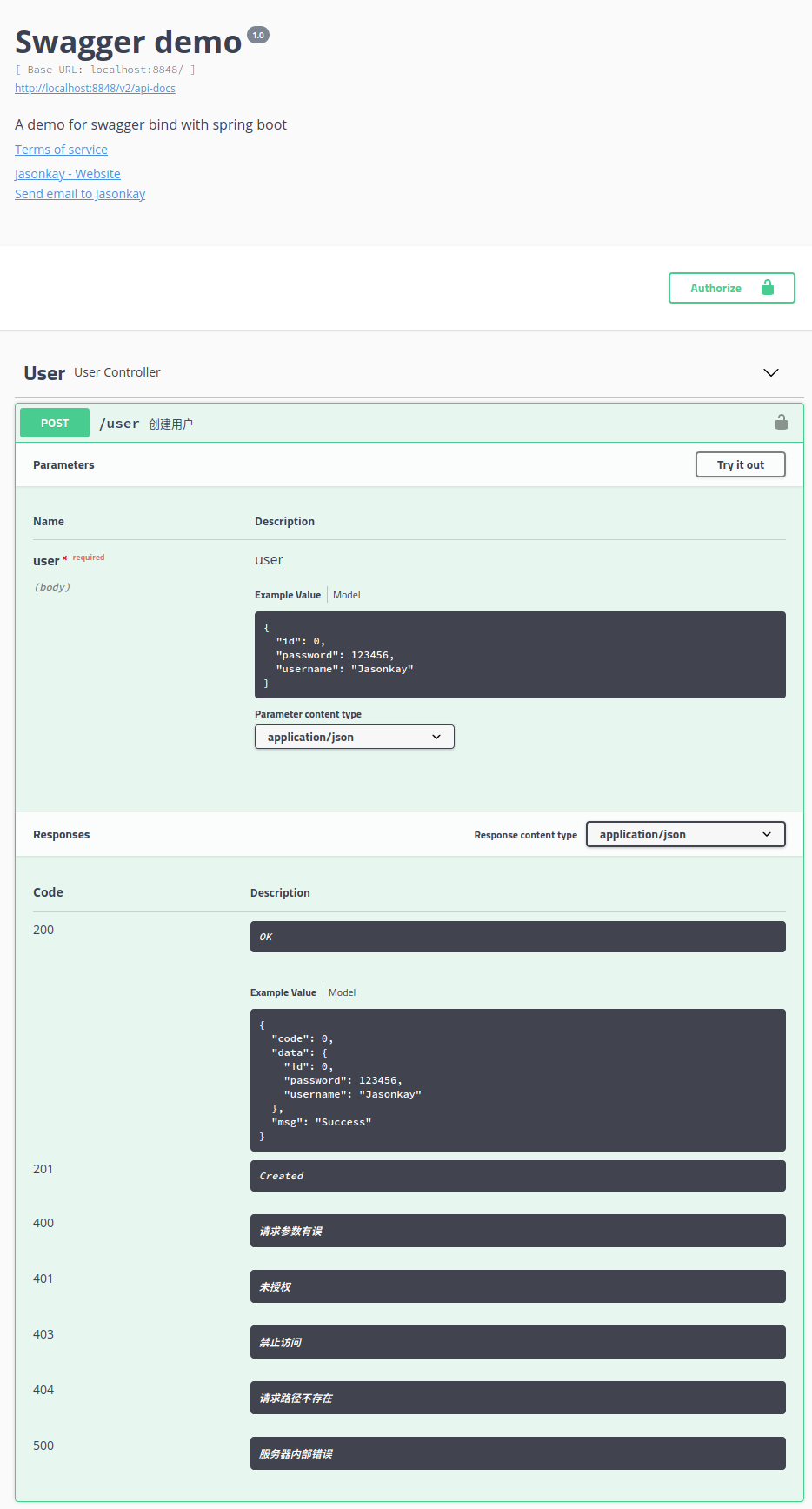
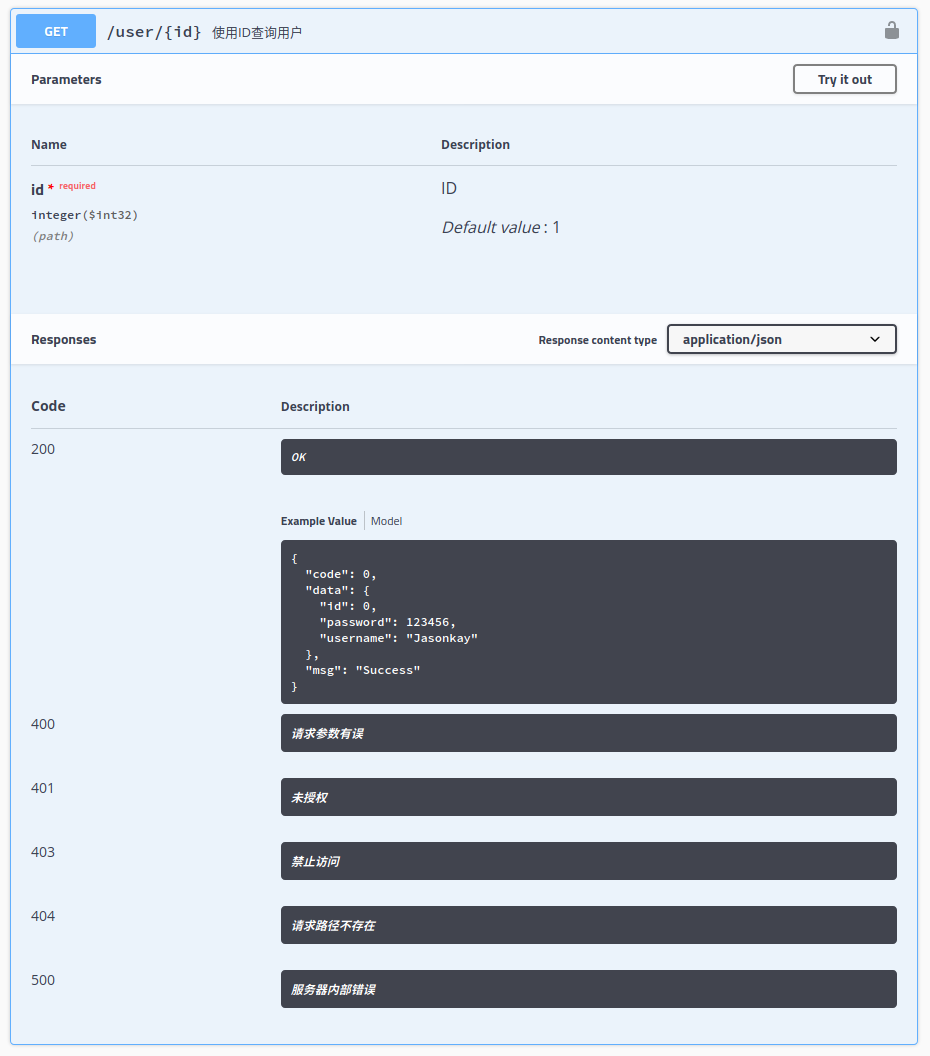
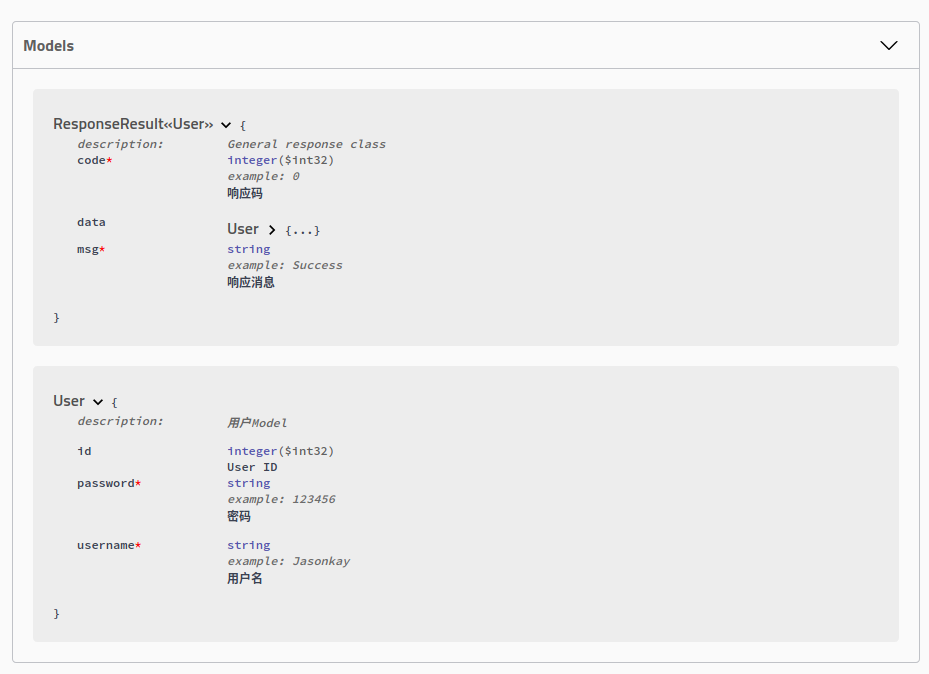
演示界面

swaggerDemo1.png

swaggerDemo2.png

swaggerDemo3.png


具体源码可参考: https://github.com/JasonkayZK/Java_Samples/tree/swagger


本文作者:Jasonkay
本文链接:https://jasonkayzk.github.io/cn/2020/01/02/SpringBoot%E9%9B%86%E6%88%90Swagger/
版权声明:本文采用 CC BY-NC-SA 3.0 CN 协议进行许可